Technology is one of the most important investments a business makes, yet many organizations only think about their IT equipment when something goes wrong. Computers slow down, servers reach the end of their lifespan, software becomes unsupported, or network equipment starts causing outages. At that point, businesses are often forced into expensive emergency purchases that weren’t planned for in the budget.
A technology lifecycle management strategy helps businesses take a proactive approach to managing their IT assets. Rather than reacting to failures, organizations can plan hardware upgrades, software updates, maintenance, and replacements before they become costly problems.
Whether you’re a small business or a growing organization with multiple locations, having a clear technology lifecycle management plan can improve reliability, reduce downtime, strengthen cybersecurity, and make budgeting far more predictable.
What Is Technology Lifecycle Management?
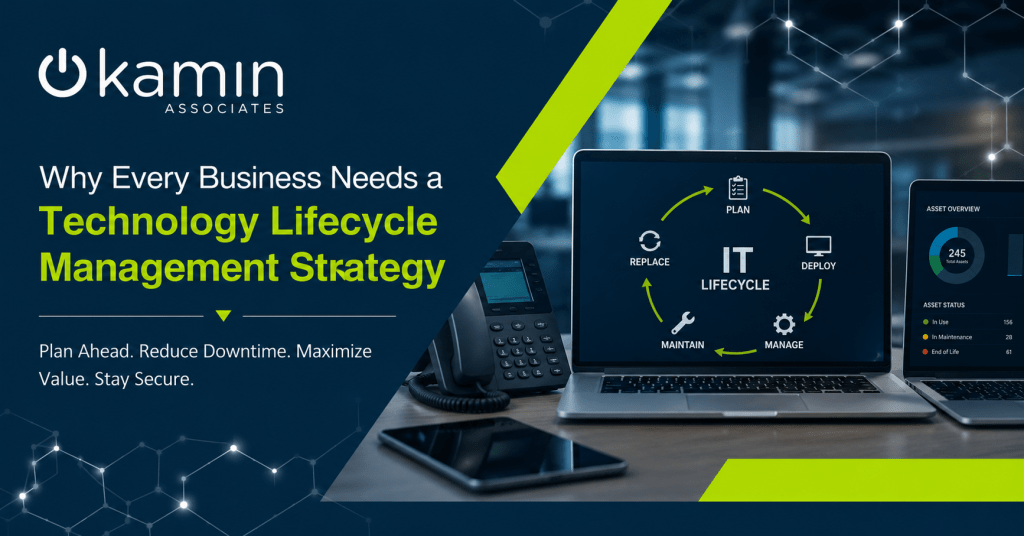
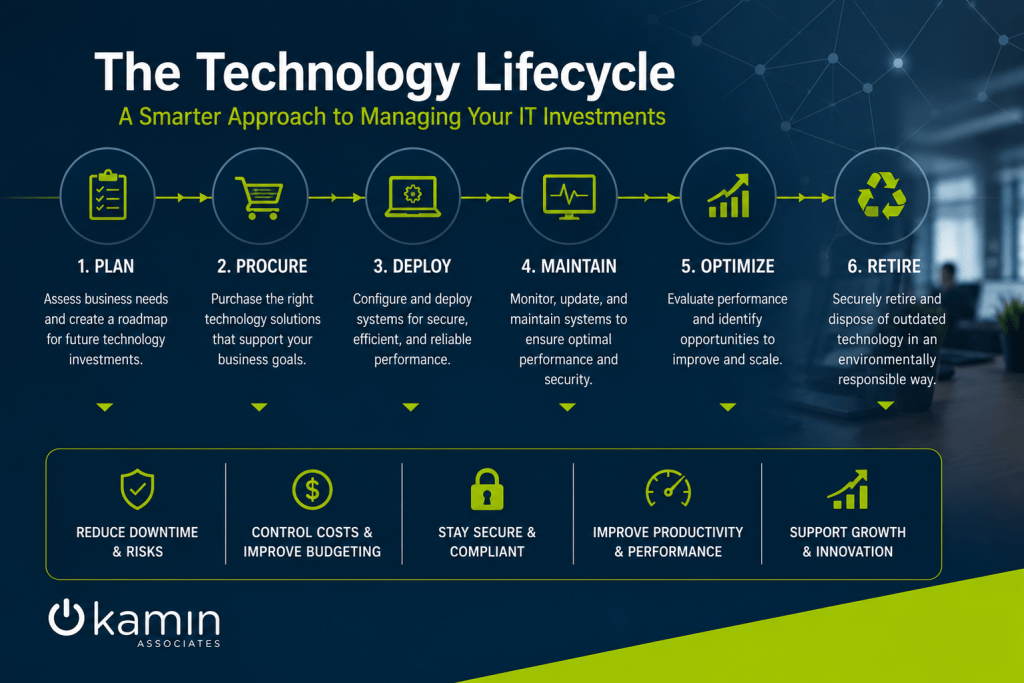
Technology lifecycle management (TLM) is the process of managing every stage of an IT asset’s life—from planning and procurement to deployment, maintenance, upgrades, and eventual replacement.
Rather than viewing technology as a one-time purchase, lifecycle management treats each device and system as an ongoing investment that requires planning and oversight.
A comprehensive lifecycle strategy typically includes:
- Asset inventory and documentation
- Hardware procurement
- Device deployment and configuration
- Software licensing management
- Routine maintenance
- Security updates and patch management
- Performance monitoring
- Warranty tracking
- End-of-life planning
- Secure disposal and data destruction
Managing technology throughout its entire lifecycle allows businesses to maximize the value of every IT investment while minimizing unexpected disruptions.
Why Waiting for Equipment to Fail Is Expensive
Many businesses operate under a “replace it when it breaks” philosophy. While this may seem cost-effective at first, reactive IT management often creates larger problems than expected.
Unexpected hardware failures can lead to:
- Lost employee productivity
- Downtime for critical business systems
- Emergency replacement costs
- Potential data loss
- Increased cybersecurity risks
- Customer service disruptions
For example, if an aging server fails unexpectedly, employees may lose access to files, business applications, email, or customer databases. The cost of replacing the hardware is only one part of the equation—the lost productivity and operational downtime can be even more significant.
A lifecycle management strategy helps identify aging equipment before it reaches that point.
Improve Budgeting with Planned Technology Refreshes
One of the biggest advantages of lifecycle management is predictable budgeting.
Instead of facing several unexpected technology purchases in the same year, businesses can spread replacements over multiple budget cycles.
For example, rather than replacing every workstation at once, a company may choose to replace 20–25% of its computers each year. This staggered approach helps:
- Avoid large capital expenses
- Maintain consistent technology performance
- Reduce business disruption
- Improve long-term financial planning
Having a technology roadmap also allows leadership to anticipate future investments instead of scrambling to respond to emergencies.
Reduce Security Risks
Older technology isn’t just slower—it often becomes a security liability.
As hardware and software age, manufacturers eventually stop providing updates and security patches. Once devices reach end-of-support status, newly discovered vulnerabilities may never be fixed.
Cybercriminals actively target outdated operating systems, unsupported applications, and aging network equipment because they know these systems are less protected.
Technology lifecycle management helps businesses stay ahead of these risks by ensuring:
- Operating systems remain supported
- Firmware stays current
- Security patches are installed regularly
- Unsupported hardware is replaced before it becomes vulnerable
- Software licenses remain up to date
Maintaining current technology significantly reduces your organization’s attack surface.
Increase Employee Productivity
Employees rely on technology every day to perform their jobs efficiently.
Slow computers, unreliable Wi-Fi, outdated applications, and aging printers can create constant frustration and reduce productivity without businesses even realizing the impact.
Small delays throughout the workday add up quickly.
By regularly evaluating the health and performance of technology assets, businesses can replace or upgrade equipment before declining performance affects employees.
Modern hardware also supports newer software, collaboration platforms, and security features that older devices may struggle to run effectively.
Extend the Life of Your Technology
Lifecycle management isn’t just about replacing equipment—it also focuses on maximizing the value of existing assets.
Routine maintenance can significantly extend the lifespan of many technology investments.
Examples include:
- Monitoring storage capacity
- Cleaning internal hardware
- Updating firmware
- Replacing failing hard drives
- Managing battery health
- Applying software updates
- Optimizing system performance
These proactive maintenance tasks help reduce unexpected failures while ensuring technology continues operating efficiently throughout its useful life.
Gain Better Visibility into Your IT Environment
Many organizations don’t have a complete picture of the technology they own.
Without accurate documentation, it becomes difficult to answer questions such as:
- Which computers are due for replacement?
- Which devices are still under warranty?
- Which software licenses are about to expire?
- How many laptops are currently deployed?
- Which servers have reached end-of-support?
Technology lifecycle management starts with maintaining an accurate inventory of all IT assets.
This centralized visibility allows businesses to make informed decisions about upgrades, budgeting, maintenance, and future growth.
Support Business Growth
As organizations expand, their technology requirements become more complex.
Adding employees, opening new offices, supporting remote workers, or implementing new software all require careful planning.
A lifecycle management strategy ensures your technology evolves alongside your business.
Instead of constantly reacting to changing needs, organizations can develop long-term technology roadmaps that align with business goals.
This proactive planning helps ensure infrastructure is ready to support future growth without creating unnecessary delays or unexpected costs.
Simplify Compliance Requirements
Many industries have regulatory or cybersecurity requirements related to technology management.
Maintaining outdated systems can make compliance significantly more difficult.
Lifecycle management helps organizations demonstrate responsible IT practices by maintaining:
- Current software versions
- Documented hardware inventories
- Supported operating systems
- Timely security updates
- Proper asset disposal procedures
- Accurate licensing records
These practices often support compliance efforts while reducing operational risk.
Don’t Forget About Secure Disposal
Replacing technology is only one part of the lifecycle.
Businesses also need to securely retire old equipment.
Simply deleting files before disposing of a computer or server is rarely enough to protect sensitive information.
Technology lifecycle management includes secure data destruction procedures that help prevent confidential business information, customer records, and financial data from falling into the wrong hands.
Proper disposal also ensures businesses meet environmental and regulatory requirements when retiring electronic equipment.
Partner with an Experienced IT Provider
Developing a successful technology lifecycle management strategy requires more than maintaining a spreadsheet of devices.
It involves continuous monitoring, strategic planning, cybersecurity awareness, budgeting, maintenance, procurement, and long-term forecasting.
An experienced managed IT services provider can help businesses:
- Build and maintain a complete asset inventory
- Track warranties and hardware lifecycles
- Plan technology refresh schedules
- Monitor device health
- Keep systems updated and secure
- Recommend upgrades based on business needs
- Align technology investments with long-term business objectives
Instead of reacting to technology problems as they arise, organizations gain a proactive IT strategy designed to support productivity, security, and growth.
Build a Smarter Long-Term IT Strategy
Technology is too important to manage reactively. Every computer, server, network device, and software application has a lifecycle, and planning for each stage helps businesses avoid unnecessary costs, reduce downtime, and strengthen cybersecurity.
A well-designed technology lifecycle management strategy transforms IT from a series of unexpected expenses into a planned business investment. By understanding where your technology stands today and preparing for tomorrow’s needs, your organization can make smarter decisions, improve operational efficiency, and stay focused on what matters most—serving customers and growing the business.
If you’re unsure whether your current technology is supporting your long-term goals, partnering with an experienced IT provider can help you build a lifecycle management strategy that keeps your business secure, productive, and prepared for the future.