Cloud migration can unlock major benefits for growing businesses, including better scalability, improved flexibility, stronger security, and reduced infrastructure costs. But for many organizations, one concern rises above the rest: downtime. Even short disruptions can impact productivity, customer experience, revenue, and employee confidence. That is why planning for uptime is one of the most important parts of any migration strategy.
The good news is that downtime is not inevitable. With the right approach, businesses can move workloads, applications, and data to the cloud while keeping operations running smoothly. Kamin Associates helps organizations design cloud environments, manage IT infrastructure, and support secure technology transitions that reduce business disruption and long-term risk.
Below are the top strategies for minimizing downtime during cloud migration and ensuring a smoother transition.
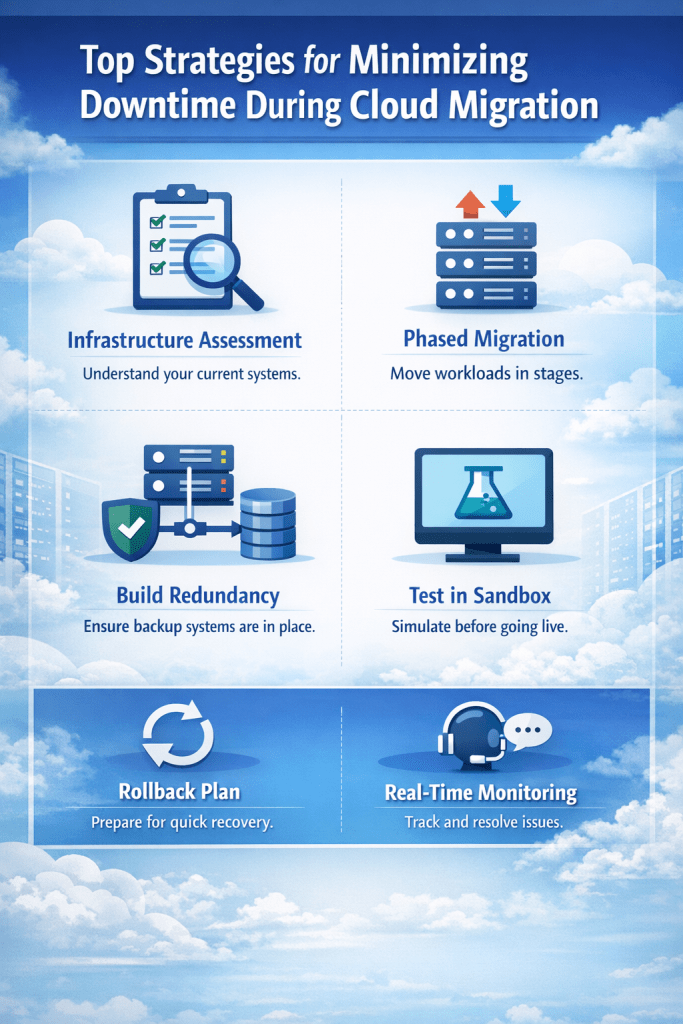
1. Start with a Full Infrastructure Assessment
Many migration issues happen before the migration even begins. If your business does not fully understand its current systems, dependencies, and workflows, unexpected outages become much more likely.
Before moving anything, conduct a detailed assessment of your environment. This should include:
- Servers and storage systems
- Business applications
- Databases
- Network configurations
- Security tools
- User access requirements
- Integrations between systems
Some applications rely heavily on others, and migrating one without the other can create service interruptions. Mapping dependencies early allows your IT team to create the right migration sequence and avoid unnecessary downtime. Kamin Associates emphasizes customized infrastructure planning to align technology decisions with business goals.
2. Prioritize Workloads by Business Impact
Not every system needs to move at the same time. One of the most effective ways to reduce downtime is to rank workloads based on criticality.
Ask questions such as:
- Which applications are essential to daily operations?
- Which systems are customer-facing?
- What can tolerate temporary interruptions?
- Which workloads are easiest to migrate first?
This helps create a phased migration plan. Lower-risk systems can move first, allowing teams to test processes and resolve issues before handling mission-critical applications. By migrating in stages, businesses avoid putting all operations at risk during a single cutover.
3. Use a Phased Migration Approach
A “big bang” migration, where everything moves at once, may sound efficient, but it often creates the highest risk for downtime. A phased migration is usually the safer and smarter path.
With a phased approach, workloads are migrated in smaller groups over time. Benefits include:
- Easier troubleshooting
- Less operational disruption
- Better user adoption
- Lower risk of widespread outages
- More control over scheduling
For example, an organization might begin with file storage, then internal apps, then customer-facing systems, and finally core databases. If an issue appears in one phase, it can be corrected without impacting the entire business.
4. Schedule Migration During Off-Peak Hours
Timing matters. Even a well-executed migration can create brief slowdowns or interruptions. To minimize the impact, schedule key migration events during evenings, weekends, holidays, or historically low-traffic periods.
For some businesses, that may mean after business hours. For others, it may mean seasonal slow periods. The right timing depends on customer demand, internal workflows, and staffing schedules.
When migrations happen during low-usage windows, any temporary disruption affects fewer users and gives IT teams more room to respond quickly.
5. Build Redundancy Before the Cutover
Redundancy is one of the strongest defenses against downtime. Before switching systems fully to the cloud, ensure you have backup options available.
This may include:
- Secondary internet connections
- Temporary failover systems
- Replicated workloads
- Backup databases
- Local copies of critical files
- Alternative communication tools
If something goes wrong during migration, redundancy allows employees and customers to continue accessing key services. Kamin Associates also highlights business continuity and proactive support as part of its IT service model, helping clients reduce the impact of disruptions.
6. Test in a Sandbox Environment First
Never make production systems the first place you test your migration plan. A sandbox or staging environment allows teams to simulate the migration before live systems are affected.
Testing should include:
- Application performance
- Login processes
- Permissions and access controls
- Database connectivity
- File transfers
- Integrations with third-party tools
- Security settings
This step helps uncover hidden problems early, such as broken dependencies, firewall issues, or performance bottlenecks. Solving these issues before go-live dramatically reduces downtime risk.
7. Keep Data Synced During Transition
One common cause of migration downtime happens when businesses freeze systems for large data transfers. Instead of relying on one massive move, use synchronization tools that continuously replicate data between the old environment and the new one.
This allows users to continue working while data updates in the background. At final cutover, only the most recent changes need to sync, reducing outage windows significantly.
For businesses with large databases or active collaboration environments, ongoing replication can be the difference between hours of downtime and just minutes.
8. Create a Clear Rollback Plan
Even the best migration plans need a backup plan. If systems fail after cutover, your team should know exactly how to restore operations quickly.
A rollback plan should define:
- What triggers a rollback decision
- Who approves the rollback
- How systems revert to the original environment
- How data integrity will be maintained
- How users will be informed
Without a rollback strategy, teams may waste valuable time debating next steps during an outage. A documented recovery path reduces confusion and shortens downtime.
9. Communicate with Employees and Stakeholders
Technology downtime often feels worse when users are surprised by it. Clear communication is essential before, during, and after migration.
Employees should know:
- What systems are changing
- When work may be affected
- What to do if issues arise
- Where to get support
Customers or vendors may also need updates if external systems are involved. Proactive communication helps set expectations, reduces support tickets, and builds trust throughout the transition.
10. Monitor Systems in Real Time
Migration does not end once workloads are moved. Real-time monitoring is critical during and after the cutover period.
IT teams should track:
- Application availability
- Login failures
- Network latency
- Resource usage
- Error logs
- Security alerts
- User experience issues
The faster problems are detected, the faster they can be fixed. Kamin Associates offers proactive monitoring and managed support services designed to help businesses identify and resolve issues before they become larger disruptions.
11. Partner with Experienced Cloud Migration Experts
Many businesses underestimate how complex migration can be. Internal teams may be excellent at day-to-day IT support but still lack specialized migration experience. Working with an experienced technology partner reduces risk, speeds execution, and improves planning.
A trusted provider can help with:
- Migration strategy
- Infrastructure design
- Security planning
- Compliance requirements
- Cutover execution
- Monitoring and support
- Long-term optimization
Kamin Associates provides cloud guidance, managed IT services, cybersecurity support, and infrastructure expertise to help organizations modernize with less disruption and more confidence.
Final Thoughts
Cloud migration should move your business forward, not bring it to a halt. By assessing your environment, prioritizing workloads, using phased migrations, testing thoroughly, syncing data, and planning for contingencies, businesses can dramatically reduce downtime during the transition.
The most successful migrations combine smart planning with expert execution. If your organization is preparing for a cloud move, Kamin Associates can help you build a secure migration strategy that keeps your business productive every step of the way.