
When technology works, it is easy to take it for granted. Employees log in, access applications, communicate with customers, and complete their work without thinking much about the systems operating behind the scenes.
That changes quickly when something breaks.
A server goes down. An employee cannot access a critical application. A workstation suddenly becomes unusable. The network slows to a crawl. When businesses rely primarily on reactive IT support, these problems often have to disrupt operations before someone starts working on them.
Proactive IT support takes a different approach. Instead of waiting for technology problems to become emergencies, businesses continuously maintain, monitor, and manage their IT environments to identify potential issues earlier.
Both approaches involve solving IT problems. The difference is when those problems receive attention and how much disruption occurs before they are addressed.
For businesses trying to control technology costs and maintain productivity, understanding the difference between reactive and proactive IT support can help determine whether the current approach to IT is actually working.
What Is Reactive IT Support?
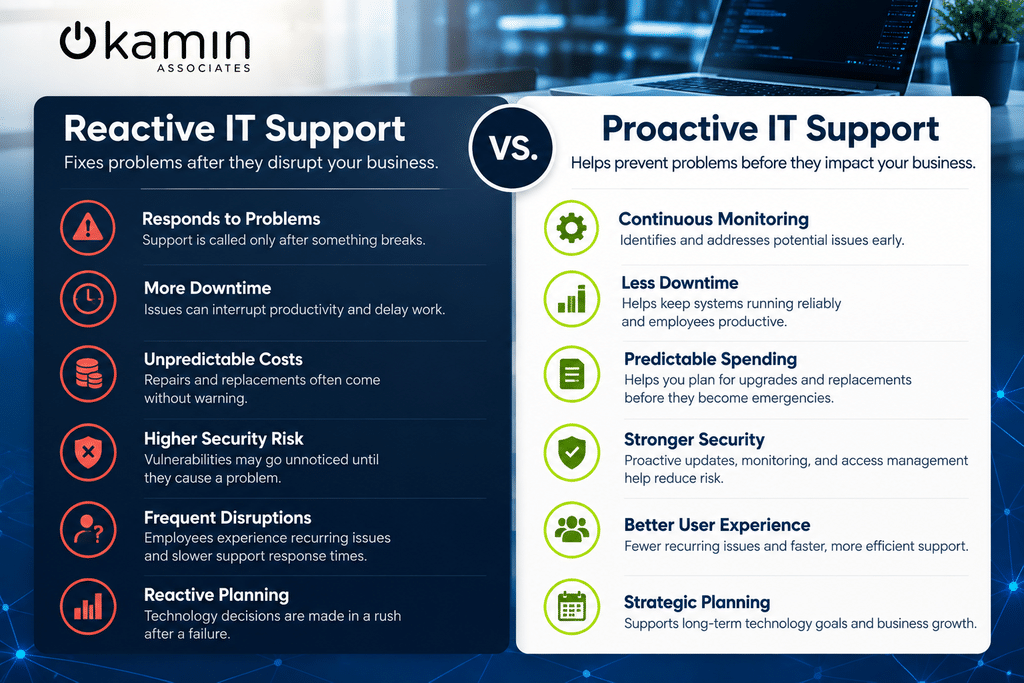
Reactive IT support follows a relatively simple model: something goes wrong, and then someone calls IT.
This traditional break-fix approach may work for occasional, isolated technology problems. However, it can become increasingly difficult to manage as a business adds employees, devices, applications, cloud platforms, and locations.
Common examples of reactive IT support include:
- Calling for assistance after a computer stops working
- Troubleshooting a network after employees lose connectivity
- Replacing hardware only after it fails
- Investigating storage problems after a server reaches capacity
- Addressing security vulnerabilities after they cause an incident
- Updating systems only when outdated software creates compatibility problems
The immediate problem may eventually get fixed, but the organization has already experienced the disruption.
Businesses that frequently find themselves responding to technology emergencies may benefit from a more structured approach to IT Support Services.
What Is Proactive IT Support?
Proactive IT support focuses on maintaining the technology environment before problems significantly affect users.
Instead of relying solely on employees to notice and report issues, IT teams use monitoring, maintenance, documentation, asset management, and planning to understand what is happening throughout the technology environment.
A proactive strategy may include:
- Monitoring servers, networks, devices, and other infrastructure
- Installing software and security updates
- Tracking hardware age and warranties
- Maintaining accurate IT documentation
- Reviewing system performance
- Managing user accounts and permissions
- Planning hardware and software replacements
- Identifying recurring support problems
- Reviewing cybersecurity vulnerabilities
- Creating long-term technology plans
For example, 24/7 IT infrastructure monitoring can give IT teams greater visibility into system health and performance. Instead of learning about every problem from an employee support ticket, technicians may be able to identify warning signs earlier.
The Hidden Cost of Waiting for Something to Break
The price of reactive IT support extends beyond the invoice for repairing a device or resolving an outage.
Consider what happens when a critical system suddenly stops working.
Employees may be unable to complete their jobs. Customer requests may be delayed. Internal projects can fall behind schedule. IT personnel may need to abandon planned work to handle the emergency. Leadership may also become involved if the disruption affects a large portion of the organization.
Even relatively small technology problems can create significant costs when they repeatedly interrupt employees.
An unreliable workstation that wastes several minutes each day may not seem like a major IT issue. Multiply those delays across multiple employees over weeks or months, however, and they can become a persistent productivity problem.
Proactive IT management attempts to reduce these interruptions by addressing the underlying technology environment instead of repeatedly responding to symptoms.
Proactive Monitoring Can Help Reduce Downtime
One of the biggest limitations of reactive IT is visibility.
If your IT team only learns about a problem when an employee submits a ticket, the issue may have existed for hours, days, or even weeks.
Monitoring can provide visibility into areas such as server health, network performance, storage capacity, hardware status, and other infrastructure conditions. When abnormal activity appears, IT teams can investigate before the problem develops into a larger disruption.
Monitoring alone does not prevent every technology failure. Hardware can still break, internet connections can fail, and unexpected problems will occur.
The advantage is having more information available to respond appropriately and, when possible, address warning signs before users experience a major interruption.
Reactive IT Can Make Technology Spending Unpredictable
Another disadvantage of the break-fix model is unpredictable spending.
If several computers fail within a short period or an aging server suddenly needs to be replaced, the business may face a significant technology expense that was never included in the budget.
Proactive IT management makes it easier to anticipate these expenses.
A technology lifecycle management strategy helps organizations track their equipment throughout its useful life and plan upgrades and replacements before failures force an emergency purchase.
Similarly, IT asset management provides visibility into devices, warranties, software licenses, and upcoming technology needs.
Instead of asking, “What broke this month?” businesses can begin asking, “What technology investments should we prepare for over the next year?”
That shift can make IT budgeting considerably more predictable.
Proactive IT Support Can Strengthen Cybersecurity
The reactive versus proactive distinction is particularly important when it comes to cybersecurity.
Waiting for a security problem to become obvious can expose a business to unnecessary risk.
Cybersecurity requires ongoing attention to endpoints, networks, applications, cloud environments, user access, patches, and employee awareness. Kamin Associates’ IT Security Services address multiple areas of business security, including network, endpoint, data, application, and cloud security.
Proactive IT management can also help organizations identify unsupported software, outdated devices, missing patches, improper access, and other weaknesses before they contribute to a larger security problem.
Security therefore becomes part of routine IT management rather than something the organization thinks about only after an incident occurs.
Good Documentation Makes Support More Efficient
Proactive support is not just about monitoring tools.
IT teams also need accurate information about the environments they support.
Network configurations, device inventories, application information, procedures, user access, vendor information, and other records can help technicians understand an environment before troubleshooting begins.
As explained in Kamin Associates’ article on why IT documentation is essential for reliable IT support, documentation can help technicians spend less time gathering basic information and provide a clearer picture of the technology environment.
Documentation is especially important as organizations grow. Technology that was once managed by one or two people can become much more complicated as new employees, offices, applications, and devices are added.
Proactive Does Not Mean Problems Never Happen
No IT provider can guarantee that a business will never experience another technology problem.
Proactive IT support is about reducing avoidable problems, identifying issues sooner, and being better prepared when something unexpected occurs.
There will always be a reactive component to IT support. Employees will still need a help desk. Devices will occasionally fail. Software will behave unexpectedly.
The goal is to prevent the IT department from spending all of its time responding to emergencies.
When routine monitoring, maintenance, documentation, security, and planning are already in place, IT teams can spend more time improving the environment instead of constantly trying to restore it.
Is Your Business Stuck in Reactive IT Mode?
Businesses do not always realize they have adopted a reactive IT strategy.
Some common warning signs include recurring technology problems, frequent unexpected downtime, aging equipment, inconsistent updates, unclear documentation, unpredictable IT expenses, and employees regularly discovering problems before the IT team does.
Another sign is that nearly every conversation about technology begins with an immediate problem.
A healthier IT strategy should also include conversations about upcoming needs, security improvements, infrastructure performance, equipment lifecycles, business growth, and long-term technology investments.
Move From IT Firefighting to Long-Term IT Management
Technology should help your employees work efficiently, serve customers, and support business growth. When IT management revolves around waiting for something to fail, technology can instead become a source of disruption and unpredictable expenses.
Moving toward proactive IT support does not mean eliminating every technical problem. It means building the monitoring, maintenance, documentation, security, and planning processes needed to identify risks earlier and manage technology more effectively.
Kamin Associates provides comprehensive IT support designed to help businesses maintain reliable technology environments while addressing both immediate support needs and long-term IT management.
If your organization spends too much time reacting to technology problems, it may be time for a more proactive approach. Contact Kamin Associates to discuss how professional IT support can help keep your technology secure, reliable, and ready to support your business.